There is so much talk these days about the new Canon 5D Mark III, the Nikon D4 and so on... But $6,000 on a camera? Sorry, I can't justify that expense... Just because a new camera has been released then does that mean all other cameras are obsolete?
I have been searching for a backup camera body lately and was debating between another Nikon D700 ($2000 used) or get something else... Maybe a used D3s, D300s? Lot's of choices out there.
It was then that I had an epiphany. It was time to practice what I preach. It's not the camera that makes the photographer, rather it's the photographer who makes the photographer. Unfortunately, I fell into this downward spiral of constantly "needing" the latest and greatest cameras as soon as they are released.
On that note, these same people are practically giving away their old cameras so they can drop some serious coin on the latest and greatest. So what did I decide on for a backup body?
How about a like-new Nikon D70 Digial SLR with under 9,000 actuations for a whopping $213.49!
Plus the D70 has an electronic shutter so I can achieve flash sync speeds of up to 1/500." Not too bad if you ask me. Sure I am spoiled by the large 3" LCD screen but who cares. $200 is $200.
I want to hear all about your "new" old purchase whether it be a camera body, lens or photography gadget. Be sure to leave a comment below.
Thanks for stopping by.
Mike
Showing posts with label d-slr. Show all posts
Showing posts with label d-slr. Show all posts
3.29.2012

1.14.2011
Nikon Flash And Exposure Compensation
Just a quick FYI for you Nikon shooters out there. In case you didn't know already, Nikon does something really cool (yet can bite you in the you know what) when you are shooting in Av, Tv or P modes.
Cameras are getting smarter, but they are still stupid. The technology now is better than ever yet the cameras still can (and do) get fooled.
When you set your camera up to shoot in Aperture Priority (Av), Shutter Priority (Tv) or Program (P) mode, all that the camera does is set your Shutter and/or Aperture values for 18% gray. Awesome if you are shooting concrete, crummy if you are shooting a bride.
We therefore have to "enlighten" the camera and tell it that what it 'thinks' it knows is wrong and override the settings. This is done via the Exposure Compensation button. Set it to some plus or minus value and the camera will then over/under expose each shot by however many stops you choose...
But how does that work if you have a flash mounted to your camera?
Nikon has the best flash technology that I have seen par none and they thought long and hard about this and came up with the following:
Nikon takes the flash exposure compensation that the speedlight is set to AND THEN factors in what the camera's exposure compensation is. What this means is that if your flash is set to -1 ev (exposure value) while your camera is set to +1 ev then your flash will actually be outputting 0 ev.
If your camera is set to -.3ev and your flash is set to -.7 ev then your flash will actually operate at -1 ev...
If you are studious enough then you may be asking yourself "...but what happens when we switch our camera over to Manual mode?"
Great question and I'm glad you asked that...
When you switch over to Manual mode, the flash exposure compensation will still honor the -.3ev or -.7ev or whatever your exposure compensation (along with flash exposure compensation) is set to.
So make sure your camera's exposure compensation is set to 0ev when you want to make sure that it isn't going to affect anything.
Enjoy!
Michael
Cameras are getting smarter, but they are still stupid. The technology now is better than ever yet the cameras still can (and do) get fooled.
When you set your camera up to shoot in Aperture Priority (Av), Shutter Priority (Tv) or Program (P) mode, all that the camera does is set your Shutter and/or Aperture values for 18% gray. Awesome if you are shooting concrete, crummy if you are shooting a bride.
We therefore have to "enlighten" the camera and tell it that what it 'thinks' it knows is wrong and override the settings. This is done via the Exposure Compensation button. Set it to some plus or minus value and the camera will then over/under expose each shot by however many stops you choose...
But how does that work if you have a flash mounted to your camera?
Nikon has the best flash technology that I have seen par none and they thought long and hard about this and came up with the following:
Nikon takes the flash exposure compensation that the speedlight is set to AND THEN factors in what the camera's exposure compensation is. What this means is that if your flash is set to -1 ev (exposure value) while your camera is set to +1 ev then your flash will actually be outputting 0 ev.
If your camera is set to -.3ev and your flash is set to -.7 ev then your flash will actually operate at -1 ev...
If you are studious enough then you may be asking yourself "...but what happens when we switch our camera over to Manual mode?"
Great question and I'm glad you asked that...
When you switch over to Manual mode, the flash exposure compensation will still honor the -.3ev or -.7ev or whatever your exposure compensation (along with flash exposure compensation) is set to.
So make sure your camera's exposure compensation is set to 0ev when you want to make sure that it isn't going to affect anything.
Enjoy!
Michael
8.22.2010
New Nikon D3100
Nikon recently announced a new camera body and three lenses for 2010. The camera sounds great but only one lens appeals to me and that is the new 85mm f/1.4 lens.
The Nikon D3100 has some real great bells and whistles and is quite the entry level camera! Decent low light performance as well. I think that the coolest features happen to be the higher resolution, the fact that it shoots 1080P video and that there is auto focus (finally) when shooting video!
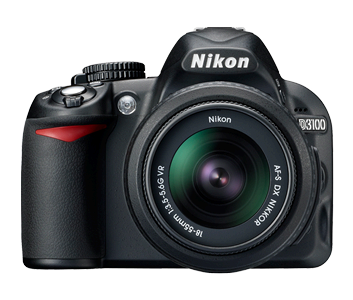
* 14.2 Megapixels
* 3" LCD
* Live View
* HD 1080p Video w/ Sound & Autofocus
* 11-point Autofocus
* 3 Frames per Second Shooting
* ISO 100 to 3200 (Expand to 12800-Hi2)
* Self Cleaning Sensor
* EXPEED 2, Image Processing Engine
* Scene Recognition System
The Nikon D3100 is available for pre-order over at B&H Photo for under $700. If I was just starting out then you better believe that this would be the camera that I would get! Click HERE to pre-order.
The Nikon D3100 has some real great bells and whistles and is quite the entry level camera! Decent low light performance as well. I think that the coolest features happen to be the higher resolution, the fact that it shoots 1080P video and that there is auto focus (finally) when shooting video!
* 14.2 Megapixels
* 3" LCD
* Live View
* HD 1080p Video w/ Sound & Autofocus
* 11-point Autofocus
* 3 Frames per Second Shooting
* ISO 100 to 3200 (Expand to 12800-Hi2)
* Self Cleaning Sensor
* EXPEED 2, Image Processing Engine
* Scene Recognition System
The Nikon D3100 is available for pre-order over at B&H Photo for under $700. If I was just starting out then you better believe that this would be the camera that I would get! Click HERE to pre-order.
1.10.2010
Using Auto ISO
Do yourself a favor and check to see if your camera has a feature called Auto ISO. It is really cool especially if you shoot in Aperture Priority (Av) mode.
So to backtrack a little bit, Aperture Priority mode means that all you have to do is select your desired aperture and the camera figures out what proper shutter speed it should use to give your a decently exposed image. Now I say "decent" because it isn't always dead on. By default, the camera exposes for what it assumes is 18% gray. If you have a light skinned bride in a white dress then you want her to appear light or white in the image. That is where Exposure Compensation comes into play. If you need your image is under exposed (check the histogram) then dial the exposure compensation up to +0.7 or so. Vice versa if the image is too bright.
Now you still have to set your ISO but that can be a pain OR your shutter speed may end up getting set by the camera so that it is way to slow and causes camera shake or unwanted motion blur. This is where AUTO ISO comes in handy. When you enable Auto ISO on your camera, you also set a minimum shutter speed that you do not want to go slower than. For me, I toy between 1/60" and 1/80". You also get to pick what your minimum and maximum ISO should be. This is beneficial if your camera doesn't have awesome files at higher ISOs. Simply set the maximum ISO to the best high ISO files that your camera can produce. For me, I have no problem going to ISO 6400 on my D700 as long as I can ensure my images will not be under-exposed even in the slightest.
So after you set your Auto ISO up then it is time to rock and roll. What goes on in the camera is that it takes your minimum shutter speed into consideration when it's figuring out what value to use. IF the needed shutter speed is slower than your minimum then it automatically bumps up your ISO to let in more light for you and thus, allowing you to shoot at faster shutter speeds.
Hope this helps. Please comment below if you use Auto ISO and share your thoughts. Enjoy and be inLIGHTin'ed.
So to backtrack a little bit, Aperture Priority mode means that all you have to do is select your desired aperture and the camera figures out what proper shutter speed it should use to give your a decently exposed image. Now I say "decent" because it isn't always dead on. By default, the camera exposes for what it assumes is 18% gray. If you have a light skinned bride in a white dress then you want her to appear light or white in the image. That is where Exposure Compensation comes into play. If you need your image is under exposed (check the histogram) then dial the exposure compensation up to +0.7 or so. Vice versa if the image is too bright.
Now you still have to set your ISO but that can be a pain OR your shutter speed may end up getting set by the camera so that it is way to slow and causes camera shake or unwanted motion blur. This is where AUTO ISO comes in handy. When you enable Auto ISO on your camera, you also set a minimum shutter speed that you do not want to go slower than. For me, I toy between 1/60" and 1/80". You also get to pick what your minimum and maximum ISO should be. This is beneficial if your camera doesn't have awesome files at higher ISOs. Simply set the maximum ISO to the best high ISO files that your camera can produce. For me, I have no problem going to ISO 6400 on my D700 as long as I can ensure my images will not be under-exposed even in the slightest.
So after you set your Auto ISO up then it is time to rock and roll. What goes on in the camera is that it takes your minimum shutter speed into consideration when it's figuring out what value to use. IF the needed shutter speed is slower than your minimum then it automatically bumps up your ISO to let in more light for you and thus, allowing you to shoot at faster shutter speeds.
Hope this helps. Please comment below if you use Auto ISO and share your thoughts. Enjoy and be inLIGHTin'ed.
Subscribe to:
Posts (Atom)